Before proceeding, make certain that you have your Basmati username and password (these should have been provided to you by your Basmati administrator).
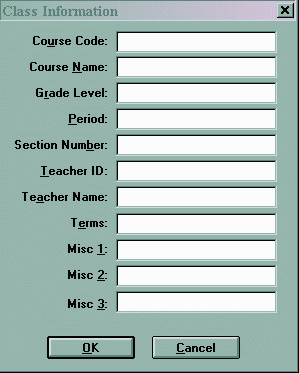
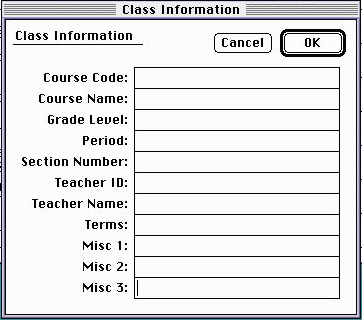
You will now enter some information into the Class | Class Information section within
Grade-Machine. From the menu, choose the Class main menu and then select the Class Information
sub menu. A dialog box will appear that will look like this (assuming you haven't yet added anything to the
boxes):
In the table below, you will find a discussion about what each field is used for within Basmati. Again, pay careful attention to those items marked with the special symbol.
| Field | Comments |
| § Course Code [REQUIRED] |
This field should contain a course-code that identifies the class and is one of the most critical fields to enter. You must be certain that the information in this field is accurate, as it is used to construct portions of the database. If you are using WSIPC, click here for more details and examples. |
| Course Name [REQUIRED] |
The Course Name field should contain the title of your class. You may enter whatever you wish in this field. This information will appear throughout the internet progress reports. |
| Grade Level | The Grade Level field may contain the grades of students enrolled in your courses. This information is not used anywhere within the database and may be left blank if you wish. |
| § Section Number [REQUIRED for WSIPC] |
This is a critical field and must be entered accurately. This is typically a 2-digit code (such as 03) that is used to identify the different sections of similar classes. If a single digit is used, a zero will automatically be added to the left of the digit to force 2-digit values. If you are using WSIPC, click here for more details and examples. |
| § § Teacher ID § § | This field contains your password as provided by your Basmati administrator. You must type this exactly as it appears. If this field is inaccurate, your grades will not post to the internet! |
| § Teacher Name [REQUIRED] |
The Teacher Name field should contain your name as you would like it to appear on internet progress reports. |
| Terms | This field should contain the terms during which your class is taught. For example, if your class is taught during first term, you should enter a 1 in this field. If your class is taught during terms 1 and 2, you should enter 12 for this field. This is not a required field. |
| § § Misc 1. § § | This field contains your username as provided by your Basmati administrator. You must type this exactly as it appears. If this field is inaccurate, your grades will not post to the internet! |
| Misc. 2 | This field is used to display a telephone number. It is suggested that you only use your work telephone number for this field. This field may be left empty |
| Misc. 3 | This field is used to control the display behavior within Basmati. You may place any of the following expressions in this field:
|
Failing to supply the course-code will cause Basmati to reject your export file and no grades will be posted to the internet. It is very critical that the course code and section number are entered accurately the first time. If corrections to these fields are required, you will need to contact your Basmati administrator to remove the incorrect versions from the database.
©2000-2001, James Bassett (all rights reserved)