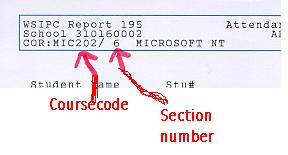
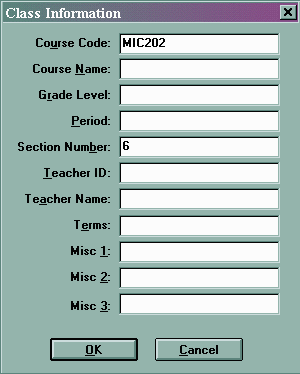
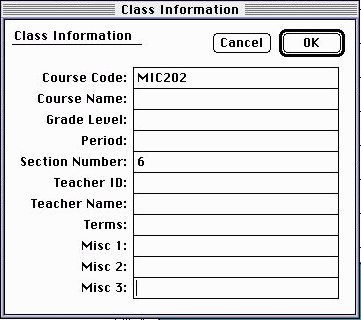
In order to take advantage of Basmati's WSIPC integration, it is very important that you enter the course code and section number correctly. Even if you've imported student data from WSIPC, you must make certain that this data appears as suggested in the Preparing Grade Machine for Basmati document.
The most fool-proof method for ensuring the correct information is to look at your attendance sheets. An example is provided below:
Other considerations when using WSIPC...
If you plan to export your grades to Basmati and use them to submit grades during grading periods, it is essential
that the student numbers are accurate within Grade Machine. The spelling of a student's name does not need to be
correct, but the ID must be accurate. ID's are entered in the ID column of the student window within Grade Machine
as illustrated below (student with ID 5555). You may also submit comments to WSIPC through the Comments column in the Student Window of
Grade Machine. To submit comments, simply separate the comment codes with commas. An example is shown below:


Finally, be aware that WSIPC will not accept A+'s or D-'s as acceptable grades. If you allow Grade Machine to use such grades, Basmati will automatically convert them to A's and D's when they are sent to WSIPC.
©1999, James Bassett (all rights reserved)